

An example of a successful forex trade using this strategy

Now for the mechanics of the strategy. As I briefly explained on the previous page, you will carefully enter a trade after having scanned the market for a definite trend - either rising or falling - not a pair that is bouncing up and down within a range.
Once you've entered a trade (and set corresponding Take Profit and Stop Loss levels), you wait for your Take Profit to hit. If, instead, you hit your Stop Loss, you set up another trade in the opposite direction (using the same distance for your Take Profit and Stop Loss levels). This is based on the assumption that the market has decided to reverse and is now heading in the opposite direction. Repeat as necessary until you've successfully hit a Take Profit level. When you hit a Take Profit, the resulting gain will cover ALL of your previous losses, and ensure that you still make a profit.
The below examples should make all of this crystal clear in your mind.
Example 1 - profit when the market goes the wrong way:
Here, we'll use the USD/CAD pair to illustrate this strategy. After scanning the market, you've found that the USD/CAD is trending upward and offers the best opportunity.
Looking at the example on the left:
A) Place a buy order at 1.3500 (0.1 lots). As soon as you have placed this order, modify the order to add a Stop Loss set 30 pips below (1.3470) and a Take Profit set 30 pips above (1.3530). You can do this by right-clicking on your order below in the Trade tab. As soon as you have finished these steps, also set up a pending order (in MT4/MT5, when you place a new order, in the "Type" field, select "Pending Order" instead of Market Execution). Here you will place a Sell Stop order (0.3 lots), so that if your initial buy order goes south and hits the stop loss, a new and larger sell order is triggered in the opposite direction; your Sell Stop order should therefore be set at 1.3470, with a SL at 1.3500 and TP at 1.3440.
B) Here, the trade set at "A" didn't go in the expected direction and was stopped out, while the pending order set at "A" was triggered. Once the pending order set in "A" is triggered, you again need to set a pending order to take over if your 2nd order ("B") also hits its Stop Loss. Your new pending order will look like this: Buy Stop order at 1.3500 (0.6 lots), Take Profit = 1.3530, Stop Loss = 1.3470.
C) Here, the trade set at "B" didn't go in the expected direction and was stopped out, while the pending order set at "B" was triggered. Once the pending order set in "B" is triggered, you again need to set a pending order to take over if your 3rd order ("C") also hits its Stop Loss. Your new pending order will look like this: Sell Stop order at 1.3470 (1.2 lots), Take Profit = 1.3440, Stop Loss = 1.3500.
D) Here, the trade set at "C" didn't go in the expected direction and was stopped out, while the pending order set at "C" was triggered. Once the pending order set in "C" is triggered, you again need to set a pending order to take over if your 4th order ("D") also hits its Stop Loss. Your new pending order will look like this: Buy Stop order at 1.3500 (2.4 lots), Take Profit = 1.3530, Stop Loss = 1.3470.
E) Bingo, the Take Profit of the current trade is hit. Immediately cancel out the pending order you set at "D" (right-click on the pending order in the Trade tab to delete it).
So, based on these 4 trades you just made:
A: loss of -20.00€
B: loss of -60.00€
C: loss of -120.00€
D: profit of 240.00€
OVERALL PROFIT = 40.00€
Please note, though, that due to the spread charged by the broker, your overall profit will be a bit lower, more like 35.00€ (more or less, depending on the spreads you are able to secure during each transaction).
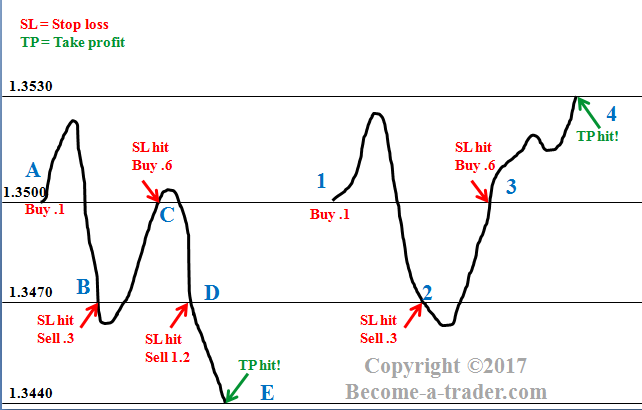
Example 2 - profit when the market goes the wrong way:
Once again, we'll use the USD/CAD pair to illustrate this strategy. After scanning the market, you've found that the USD/CAD is trending upward and offers the best opportunity.
Looking at the example on the right (same illustration, above):
1) Buy at 1.3500 (0.1 lots). As soon as you have placed this order, modify the order to add a Stop Loss set 30 pips below (1.3470) and a Take Profit set 30 pips above (1.3530). You can do this by right-clicking on your order below in the Trade tab. As soon as you have done this, also set up a pending order (in MT4/MT5, when you place a new order, in the Type field, select "Pending Order" instead of Market Execution). Here you will place a Sell Stop order (0.3 lots), so that if your initial buy order goes south and hits the stop loss, a new and larger sell order is triggered in the opposite direction; your Sell Stop order should therefore be set at 1.3470, with a SL at 1.3500 and TP at 1.3440.
2) Here, the trade set at "1" didn't go in the expected direction and was stopped out, while the pending order set at "1" was triggered. Once the pending order set in "1" is triggered, you again need to set a pending order to take over if your 2nd order ("2") also hits its Stop Loss. Your new pending order will look like this: Buy Stop order at 1.3500 (0.6 lots), Take Profit = 1.3530, Stop Loss = 1.3470.
3) Here, the trade set at "2" didn't go in the expected direction and was stopped out, while the pending order set at "2" was triggered. Once the pending order set in "2" is triggered, you again need to set a pending order to take over if your 3rd order ("3") also hits its Stop Loss. Your new pending order will look like this: Sell Stop order at 1.3470 (1.2 lots), Take Profit = 1.3440, Stop Loss = 1.3500.
4) Bingo, the Take Profit of the current trade is hit. Immediately cancel out the pending order you set at "3".
So, based on these 3 trades:
1: loss of -20.00€
2: loss of -60.00€
3: profit of 120.00€
OVERALL PROFIT = 40.00€
Again, due to the spread charged by the broker, your overall profit will be a bit lower, more like 35.00€.
Also...
When you were setting up the pending orders, you probably noticed that there were Buy Limit and Sell Limit orders as well. Our strategy doesn't require them. But just so you know what the difference is:
Buy Stop: An order to buy at a price that is higher than the current price.
Sell Stop: An order to sell at a price that is lower than the current price.
Buy Limit: An order to buy at a price that is lower than the current price.
Sell Limit: An order to sell at a price that is higher than the current price.
One last thing...
Among most of the major pairs (EUR/USD, USD/CHF, GBP/USD, USD/CAD and AUD/USD), when you set the Stop Loss and Take Profit levels, you're basically looking at the 3rd and 4th numbers of the price AFTER the decimal point.
Example: if you buy the EUR/USD at 1.1045 and want the stop loss level 30 pips below it and the take profit level 30 pips above it, your respective stop loss and take profit levels are 1.1015 and 1.1075.
However, with the USD/JPY pair, you want to look at the 1st and 2nd numbers after the decimal point.
Example: if you buy the USD/JPY at 110.81 and want the stop loss level 30 pips below it and the take profit level 30 pips above it, your respective stop loss and take profit levels are 110.51 and 111.11.
On a later page, I will offer you a free script (you can install it in under 1 minute) that will set these stop loss and take profit levels automatically!